> For the complete documentation index, see [llms.txt](https://wiki.mksdtech.com/llms.txt). Markdown versions of documentation pages are available by appending `.md` to page URLs; this page is available as [Markdown](https://wiki.mksdtech.com/beam/beam-ifc-for-rhino/properties.md).
# Ifc Properties
IFC type and predefined type per family
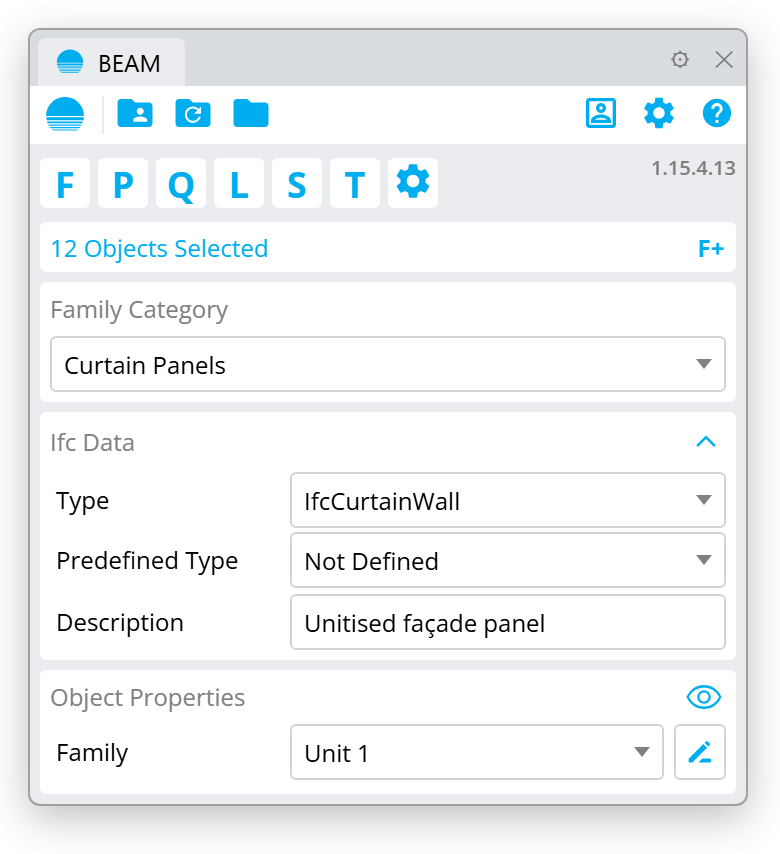
Each family has IFC properties that control how it is written to IFC. Set them in the **Ifc Data** section of the [panel](/beam/beam-for-rhinoceros/using-rhino-beam.md#ifc-data).
## Type
The IFC entity of the family's elements, for example `IfcWall` or `IfcSlab`.
* **\** picks the entity from the family's category. See [IFC Types Mapping](/beam/beam-ifc-for-rhino/ifc-types-mapping.md).
* Pick an entity to override the mapping for this family.
Available entities: IfcBeam, IfcBuildingElementProxy, IfcChimney, IfcColumn, IfcCovering, IfcCurtainWall, IfcDoor, IfcFooting, IfcFurniture, IfcMember, IfcPile, IfcPlate, IfcRailing, IfcRamp, IfcRampFlight, IfcReinforcingBar, IfcRoof, IfcShadingDevice, IfcSlab, IfcStair, IfcStairFlight, IfcSystemFurniture, IfcWall, IfcWallStandardCase, IfcWindow, IfcAirTerminal, IfcFlowFitting, IfcFlowSegment, IfcMechanicalFastener, IfcPipeFitting, IfcPipeSegment, IfcSanitaryTerminal, IfcTank, IfcTransportElement, IfcGeographicElement, IfcProxy, IfcRailway, IfcRoad, IfcSpace, IfcVirtualElement.
## Predefined Type
A more specific kind of the entity, such as a solid wall or a floor slab. These are the predefined types of the IFC standard. The list changes with the **Type**. Leave it as **Not Defined** if none fits.
## Extra IFC parameters
Some types add their own fields in the **Ifc Data** section. For example, doors get an operation type and windows a partitioning type.
## Parameters and property sets
Your [custom parameters](/beam/beam-for-rhinoceros/parameters.md) are exported as IFC properties. Each [property set](/beam/beam-for-rhinoceros/parameters.md#property-sets) becomes an `IfcPropertySet` with the same name.
{% hint style="success" %}
Name your property sets after the IFC standard sets, such as `Pset_WallCommon`, when the receiving tool expects them.
{% endhint %}
## Grasshopper
Set the IFC type from Grasshopper with **Set Ifc Family Parameters**. See [Grasshopper](/beam/beam-for-rhinoceros/grasshopper.md#write).